Data Provided — Software Database
Name | Additional Fields | Description |
|---|
General |
|---|
Product Name | | |
Online Status | | Status is only displayed if the product falls into the Scam group. |
Product Group | | |
Product Description | | |
Linked Organization | | |
Release Date | | |
Media |
|---|
In-game Screenshots | | |
GUI Screenshots | | |
Loader Screenshots | | |
Videos | | |
Verification |
|---|
Total score | | Total score is calculated based on 5 different parameters. |
General Impressions | | |
Pros | | |
Cons | | |
Verification Date | | |
Details |
|---|
Supported Anti-Cheats | | Anti-cheats that are officially declared as supported. If support exists but has not been officially confirmed, we will not take the risk of displaying such unofficial information. |
Supported OS | | |
Supported CPU | | |
Application Type | | |
Additional Hardware | | Additional hardware required to run the cheat and access its basic functionality. Optional hardware that extends the product's functionality will not be displayed. |
Game WIndow Mode | | |
Streamproof | | Has 2 options (Full or Native). Full - the product is protected from being captured by any application-based recording software under any capture conditions. It is safe to stream with this product whether you record the game window or the entire screen. Native - the product is protected from being captured by any application-based recording software, but only when the game window is selected as the source. As a rule, if entire screen recording is selected, the product will be visible. |
Limited Slots | | |
Private | | |
Playstyle | | |
Built-in Spoofer | | Only temporary-type spoofers are taken into account. |
Controller Support | | Has 2 options (Yes or Native). Yes - the product's bind system supports controller buttons without requiring any third-party utilities. Native - controller support is only available when used in combination with third-party utilities. |
Features |
|---|
Features Tab | | |
Events |
|---|
Downtime | Start Date
End Date
Description
Evidence (images) | Start Date - when the event started. End Date - when the event ended (resolved). This system was designed to display certain information objectively. Any issue has a date when it appeared and a date when it was resolved, and our system automatically calculates the time difference in days. Many providers indicate when problems with their product started (Start Date), but not when those problems were resolved (End Date). Example
For example, consider two products (A & B) that were released a little over a year ago and were both detected at launch. Product A updated within a few days, then received another detection a few months later and updated again shortly after, while Product B kept updating throughout this entire period. The resulting picture looks like this: Product A: experienced downtime for only a few days due to 2 detections, but resolved the issues quickly. Due to the number of detections, it has a Detection Rate of Low. Product B: remained in downtime the entire time and only updated after roughly 300 days, but has a Detection Rate of Very Low. As a result, we cannot definitively determine whether Product B is safer than Product A, had Product B updated more promptly, it might have been detected again, possibly multiple times. For this reason, we plan to improve the Detection Rate calculation system to account for such cases. |
Detection | Start Date
End Date
Description
Evidence (images) |
Release | |
Discontinued | Start Date
Description |
Sales |
|---|
Organization Info | Payment Methods & Fee
Plans
Links | |
Resellers Info | Reseller Name
Icon (image)
Payment Methods & Fee
Plans
Links | |
Systems — Software Database
1. Trust Score
A system that evaluates an organization and its products on a scale from 0 to 100 based on available data. As of May 2026, the system is undergoing a rework.
2. Product Rating
A system based on calculating the average total score from all reviews, which itself is based on 5 evaluation parameters (Setup, Features, Quality, Support, and Security).
3. Detection Rate
A 5-level rating system (Unknown, Very Low, Low, Medium, High) that reflects how frequently a product has been detected over time.
Initial classification (no detections):
For products with detections, the rating is determined by the time interval between detections:
≤ 89 days → High
≤ 179 days → Medium
≤ 359 days → Low
≥ 360 days → Very Low
4. Product Status
A system that displays the assumed status of a product based on available data.
It has 3 levels:
Safe to use - self-explanatory.
Warning - displayed when the product has received 5 or more detection reports within the last 7 days.
Alert - indicates that the product has either an active detection event (with no End Date provided) or a detection event recorded within the last 14 days (based on the End Date of the most recent detection).
Example
.png.4eac4c28d086b3f422385f31e8bd22a7.png "SecurityStatus (1).png")
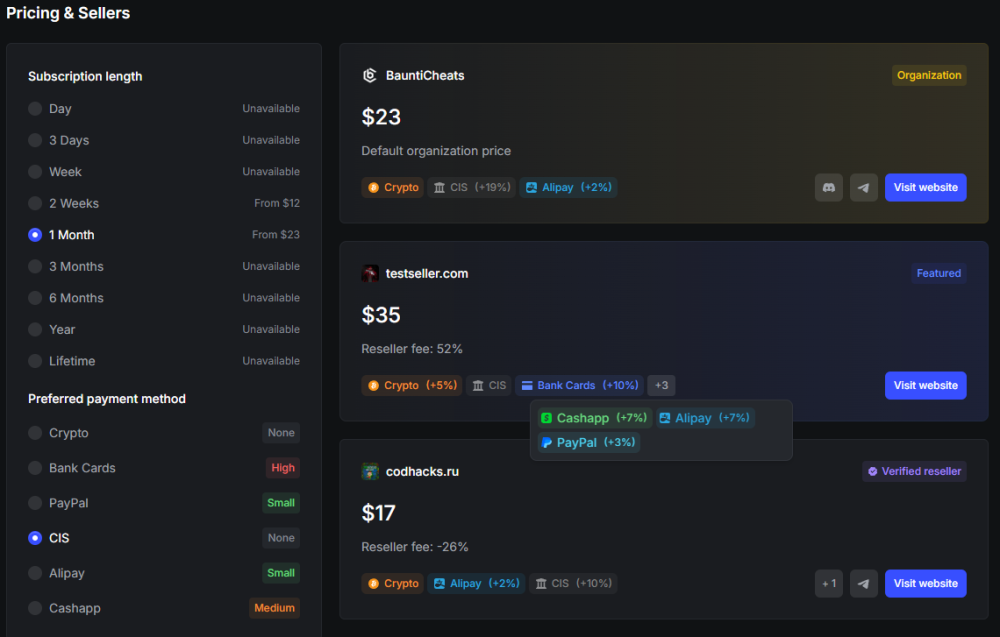
5. Pricing & Sellers
A system for selecting a store that sells the product. All known stores matching the filters on the left are listed.
Subscription length: the minimum price for each plan is displayed next to it (excluding payment method fees).
Preferred payment method: next to each payment method, labels indicate the level of additional fee charged when paying via that method. All sellers offering the given payment method are considered, and the lowest fee percentage among them is selected as indicator.
The levels are as follows:
Fee | Level |
|---|
undefined | Unavailable |
0% | None |
1-3% | Small |
4-9% | Medium |
10% or more | High |
Seller display priority and limits.
The list displays up to 5 different sellers that match the selected filters. The display priority is as follows:
Each seller record contains:
Name
Icon
Modifier label (if any)
Product price for the selected plan
Reseller fee (based on the organization's default price)
Payment methods (with additional fee indication)
Links (website, Discord, Telegram, and product thread links on other forums)
Example